Developers
API References
Data Subject Request API
Data Subject Request API Version 1 and 2
Data Subject Request API Version 3
Platform API
Key Management
Platform API Overview
Accounts
Apps
Audiences
Calculated Attributes
Data Points
Feeds
Field Transformations
Services
Users
Workspaces
Warehouse Sync API
Warehouse Sync API Overview
Warehouse Sync API Tutorial
Warehouse Sync API Reference
Data Mapping
Warehouse Sync SQL Reference
Warehouse Sync Troubleshooting Guide
ComposeID
Warehouse Sync API v2 Migration
Audit Logs API
Bulk Profile Deletion API Reference
Calculated Attributes Seeding API
Custom Access Roles API
Group Identity API Reference
Data Planning API
Pixel Service
Profile API
Events API
mParticle JSON Schema Reference
IDSync
Client SDKs
AMP
AMP SDK
Android
Initialization
Configuration
Network Security Configuration
Event Tracking
User Attributes
IDSync
Screen Events
Commerce Events
Location Tracking
Media
Kits
Application State and Session Management
Data Privacy Controls
Error Tracking
Opt Out
Push Notifications
WebView Integration
Logger
Preventing Blocked HTTP Traffic with CNAME
Workspace Switching
Linting Data Plans
Troubleshooting the Android SDK
API Reference
Upgrade to Version 5
Cordova
Cordova Plugin
Identity
Direct Url Routing
Direct URL Routing FAQ
Web
Android
iOS
iOS
Workspace Switching
Initialization
Configuration
Event Tracking
User Attributes
IDSync
Screen Tracking
Commerce Events
Location Tracking
Media
Kits
Application State and Session Management
Data Privacy Controls
Error Tracking
Opt Out
Push Notifications
Webview Integration
Upload Frequency
Preventing Blocked HTTP Traffic with CNAME
Linting Data Plans
Troubleshooting iOS SDK
Social Networks
iOS 14 Guide
iOS 15 FAQ
iOS 16 FAQ
iOS 17 FAQ
iOS 18 FAQ
API Reference
Upgrade to Version 7
Upgrade to Version 9
React Native
Getting Started
Identity
Unity
Upload Frequency
Getting Started
Opt Out
Initialize the SDK
Event Tracking
Commerce Tracking
Error Tracking
Screen Tracking
Identity
Location Tracking
Session Management
Web
Initialization
Configuration
Content Security Policy
Event Tracking
User Attributes
IDSync
Page View Tracking
Commerce Events
Location Tracking
Media
Kits
Application State and Session Management
Data Privacy Controls
Error Tracking
Opt Out
Custom Logger
Persistence
Native Web Views
Self-Hosting
Multiple Instances
Web SDK via Google Tag Manager
Preventing Blocked HTTP Traffic with CNAME
Facebook Instant Articles
Troubleshooting the Web SDK
Browser Compatibility
Linting Data Plans
API Reference
Upgrade to Version 2 of the SDK
Xamarin
Getting Started
Identity
Alexa
Quickstart
Android
Overview
Step 1. Create an input
Step 2. Verify your input
Step 3. Set up your output
Step 4. Create a connection
Step 5. Verify your connection
Step 6. Track events
Step 7. Track user data
Step 8. Create a data plan
Step 9. Test your local app
iOS Quick Start
Overview
Step 1. Create an input
Step 2. Verify your input
Step 3. Set up your output
Step 4. Create a connection
Step 5. Verify your connection
Step 6. Track events
Step 7. Track user data
Step 8. Create a data plan
Python Quick Start
Step 1. Create an input
Step 2. Create an output
Step 3. Verify output
Server SDKs
Node SDK
Go SDK
Python SDK
Ruby SDK
Java SDK
Guides
Partners
Introduction
Outbound Integrations
Outbound Integrations
Firehose Java SDK
Inbound Integrations
Compose ID
Glossary
Data Hosting Locations
Migrate from Segment to mParticle
Migrate from Segment to mParticle
Migrate from Segment to Client-side mParticle
Migrate from Segment to Server-side mParticle
Segment-to-mParticle Migration Reference
Rules Developer Guide
API Credential Management
The Developer's Guided Journey to mParticle
Guides
Composable Audiences
Composable Audiences Overview
User Guide
User Guide Overview
Warehouse Setup
Warehouse Setup Overview
Audience Setup
Frequently Asked Questions
Customer 360
Overview
User Profiles
Overview
User Profiles
Group Identity
Overview
Create and Manage Group Definitions
Calculated Attributes
Calculated Attributes Overview
Using Calculated Attributes
Create with AI Assistance
Calculated Attributes Reference
Predictions
Predictions Overview
What's Changed in the New Predictions UI
View and Manage Predictions
Predict Future Behavior
Future Behavior Predictions Overview
Create Future Behavior Prediction
Manage Future Behavior Predictions
Create an Audience with Future Behavior Predictions
Identity
Identity Dashboard
Identity Logs
Getting Started
Create an Input
Start capturing data
Connect an Event Output
Create an Audience
Connect an Audience Output
Transform and Enhance Your Data
Platform Guide
Billing
Usage and Billing Report
The New mParticle Experience
The new mParticle Experience
The Overview Map
Observability
Observability Overview
Observability User Guide
Observability Troubleshooting Examples
Observability Span Glossary
Platform Settings
Audit Logs
Key Management
Platform Configuration
Event Match Quality Dashboard
Event Forwarding
Notifications
Trends
System Alerts
Introduction
Data Retention
Data Catalog
Connections
Activity
Data Plans
Live Stream
Filters
Rules
Blocked Data Backfill Guide
Tiered Events
mParticle Users and Roles
Analytics Free Trial
Troubleshooting mParticle
Usage metering for value-based pricing (VBP)
Segmentation
Audiences
Audiences Overview
Create an Audience
Connect an Audience
Manage Audiences
Audience Sharing
Audience Expansion (Early Access)
Match Boost
FAQ
Inclusive & Exclusive Audiences (Early Access)
Inclusive & Exclusive Audiences Overview
Using Logic Blocks in Audiences
Combining Inclusive and Exclusive Audiences
Inclusive & Exclusive Audiences FAQ
Classic Audiences
Standard Audiences (Legacy)
Predictive Audiences
Predictive Audiences Overview
Using Predictive Audiences
New vs. Classic Experience Comparison
IDSync
IDSync Overview
Use Cases for IDSync
Components of IDSync
Store and Organize User Data
Identify Users
Default IDSync Configuration
Profile Conversion Strategy
Profile Link Strategy
Profile Isolation Strategy
Best Match Strategy
Aliasing
Analytics
Introduction
Core Analytics (Beta)
Setup
Sync and Activate Analytics User Segments in mParticle
User Segment Activation
Welcome Page Announcements
Settings
Project Settings
Roles and Teammates
Organization Settings
Global Project Filters
Portfolio Analytics
Analytics Data Manager
Analytics Data Manager Overview
Events
Event Properties
User Properties
Revenue Mapping
Export Data
UTM Guide
Analyses
Analyses Introduction
Segmentation: Basics
Getting Started
Visualization Options
For Clauses
Date Range and Time Settings
Calculator
Numerical Settings
Segmentation: Advanced
Assisted Analysis
Properties Explorer
Frequency in Segmentation
Trends in Segmentation
Did [not] Perform Clauses
Cumulative vs. Non-Cumulative Analysis in Segmentation
Total Count of vs. Users Who Performed
Save Your Segmentation Analysis
Export Results in Segmentation
Explore Users from Segmentation
Funnels: Basics
Getting Started with Funnels
Group By Settings
Conversion Window
Tracking Properties
Date Range and Time Settings
Visualization Options
Interpreting a Funnel Analysis
Funnels: Advanced
Group By
Filters
Conversion over Time
Conversion Order
Trends
Funnel Direction
Multi-path Funnels
Analyze as Cohort from Funnel
Save a Funnel Analysis
Explore Users from a Funnel
Export Results from a Funnel
Saved Analyses
Manage Analyses in Dashboards
Query Builder
Data Dictionary
Query Builder Overview
Modify Filters With And/Or Clauses
Query-time Sampling
Query Notes
Filter Where Clauses
Event vs. User Properties
Group By Clauses
Annotations
Cross-tool Compatibility
Apply All for Filter Where Clauses
Date Range and Time Settings Overview
User Attributes at Event Time
Understanding the Screen View Event
User Aliasing
Dashboards
Dashboards––Getting Started
Manage Dashboards
Dashboard Filters
Organize Dashboards
Scheduled Reports
Favorites
Time and Interval Settings in Dashboards
Query Notes in Dashboards
Analytics Resources
The Demo Environment
Keyboard Shortcuts
User Segments
Data Privacy Controls
Data Subject Requests
Default Service Limits
Feeds
Cross-Account Audience Sharing
Import Data with CSV Files
Import Data with CSV Files
CSV File Reference
Glossary
Video Index
Analytics (Deprecated)
Identity Providers
Single Sign-On (SSO)
Setup Examples
Introduction
Developer Docs
Introduction
Integrations
Introduction
Rudderstack
Google Tag Manager
Segment
Data Warehouses and Data Lakes
Advanced Data Warehouse Settings
AWS Kinesis (Snowplow)
AWS Redshift (Define Your Own Schema)
AWS S3 Integration (Define Your Own Schema)
AWS S3 (Snowplow Schema)
BigQuery (Snowplow Schema)
BigQuery Firebase Schema
BigQuery (Define Your Own Schema)
GCP BigQuery Export
Snowflake (Snowplow Schema)
Snowplow Schema Overview
Snowflake (Define Your Own Schema)
Developer Basics
Aliasing
Integrations
24i
Event
ABTasty
Audience
Aarki
Audience
AdChemix
Event
Actable
Feed
AdMedia
Audience
Adobe Marketing Cloud
Cookie Sync
Server-to-Server Events
Platform SDK Events
Adobe Audience Manager
Audience
Adobe Campaign Manager
Audience
Adobe Experience Platform
Event
AdPredictive
Feed
AgilOne
Event
Adobe Target
Audience
Algolia
Event
Amazon Advertising
Audience
Amazon Kinesis
Event
Amazon Redshift
Data Warehouse
Amazon S3
Event
Amazon SNS
Event
Amazon SQS
Event
Anodot
Event
Amobee
Audience
Antavo
Feed
Apptentive
Event
Apptimize
Event
Awin
Event
Apteligent
Event
Microsoft Azure Blob Storage
Event
Bidease
Audience
Bing Ads
Event
Bluecore
Event
Bluedot
Feed
Branch S2S Event
Event
Bugsnag
Event
Cadent
Audience
comScore
Event
Census
Feed
Conversant
Event
Crossing Minds
Event
Custom Feed
Custom Feed
Databricks
Data Warehouse
Datadog
Event
Didomi
Event
Eagle Eye
Audience
Edge226
Audience
Emarsys
Audience
Epsilon
Event
Everflow
Audience
Facebook Offline Conversions
Event
Google Analytics for Firebase
Event
Flurry
Event
Flybits
Event
FreeWheel Data Suite
Audience
ForeSee
Event
Friendbuy
Event
Google Ad Manager
Audience
Google Analytics
Event
Google Analytics 4
Event
Google BigQuery
Audience
Data Warehouse
Google Enhanced Conversions
Event
Google Marketing Platform
Audience
Cookie Sync
Event
Google Pub/Sub
Event
Google Marketing Platform Offline Conversions
Event
Google Tag Manager
Event
Heap
Event
Herow
Feed
Hightouch
Feed
Ibotta
Event
Hyperlocology
Event
ID5
Kit
Impact
Event
InMarket
Audience
Inspectlet
Event
Intercom
Event
ironSource
Audience
Kafka
Event
Kissmetrics
Event
LaunchDarkly
Feed
Kubit
Event
LifeStreet
Audience
LiveLike
Event
Liveramp
Audience
MadHive
Audience
Localytics
Event
mAdme Technologies
Event
Marigold
Audience
MediaMath
Audience
Mediasmart
Audience
Microsoft Ads
Microsoft Ads Audience Integration
Mintegral
Audience
Microsoft Azure Event Hubs
Event
Monetate
Event
Movable Ink
Event
Movable Ink - V2
Event
Multiplied
Event
Nanigans
Event
Nami ML
Feed
Neura
Event
NCR Aloha
Event
OneTrust
Event
Oracle BlueKai
Event
Paytronix
Feed
Persona.ly
Audience
Personify XP
Event
Plarin
Event
Primer
Event
Qualtrics
Event
Quantcast
Event
Rakuten
Event
Reveal Mobile
Event
RevenueCat
Feed
Salesforce Mobile Push
Event
Scalarr
Event
Shopify
Custom Pixel
Feed
SimpleReach
Event
Singular-DEPRECATED
Event
Slack
Event
Skyhook
Event
Smadex
Audience
SmarterHQ
Event
Snapchat Conversions
Event
Snowflake
Data Warehouse
Audience
Snowplow
Event
Splunk MINT
Event
StartApp
Audience
Talon.One
Audience
Event
Feed
Loyalty Feed
Tapad
Audience
Tapjoy
Audience
Taplytics
Event
Taptica
Audience
Teak
Audience
The Trade Desk
Audience
Event
Cookie Sync
Ticketure
Feed
Triton Digital
Audience
TUNE
Event
Vkontakte
Audience
Valid
Event
Vungle
Audience
Webtrends
Event
Webhook
Event
White Label Loyalty
Event
Wootric
Event
Yahoo (formerly Verizon Media)
Audience
Cookie Sync
Yotpo
Feed
YouAppi
Audience
Xandr
Audience
Cookie Sync
Regal
Event
Create a User Data Model
User Data Models define the core user dataset that Composable Audiences uses for segmentation. You must create at least one user data model in order to create a composable audience. Like all data models, they are built from a SQL query that selects user records and attributes from your cloud data warehouse, with a required primary ID column to uniquely identify each user. This model forms the foundation for all audiences and can be linked to other models, such as events or subscriptions, for richer targeting.
Example
Here is a simple SQL query you might use to define a user data model for your customers:
SELECT
  user_id,
  email,
  first_name,
  last_name,
  signup_date,
  country,
  marketing_opt_in,
  loyalty_tier
FROM ecommerce.usersuser_idis the primary ID for each record (each user must be unique).signup_datehelps you identify new versus long-standing users.countrylets you segment users by geography.marketing_opt_inis useful for filtering users who have consented to marketing communications.loyalty_tiercan be used to group customers into Bronze, Silver, or Gold segments.
With this model in place, you could build an audience such as “new users who signed up in the past 30 days and have opted into marketing emails.”
This example focuses on who the user is (attributes and profile information). When combined with an Event Data Model (which captures what the user does) and a Generic Data Model (which adds extra context), you can build more powerful audiences.
To create a user data model
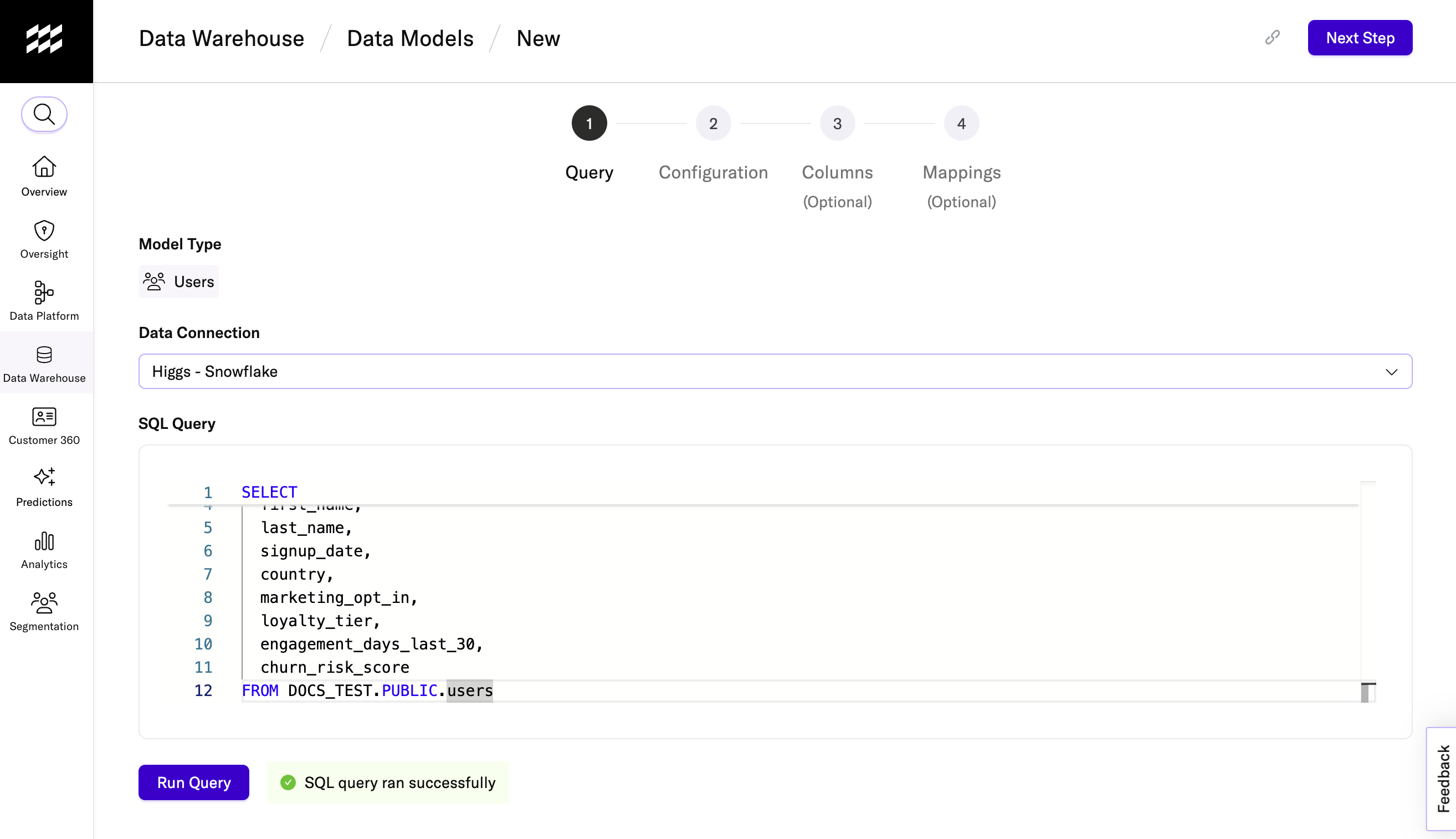
1. Enter your query
- Navigate to Data Warehouse > Data Models using the left-hand navigation.
- Click + Add Data Model in the upper right corner.
- Select User Data Model.
- Select a warehouse connection using the Data Connection dropdown menu.
- Under SQL Query, enter the SQL query you want to execute against your warehouse. You can use joins, filters, grouping, and other SQL capabilities like CASE statements to target the exact data you want to build your audiences with.
- Click Run Query to ensure that the query runs successfully.
- Click Next Step to continue.
2. Enter your configuration details
- Enter a descriptive name for your data model under Model Name.
- Select a primary ID column (such as
user_idorcustomer_id) retrieved from your SQL query to serve as the unique identifier for each user.
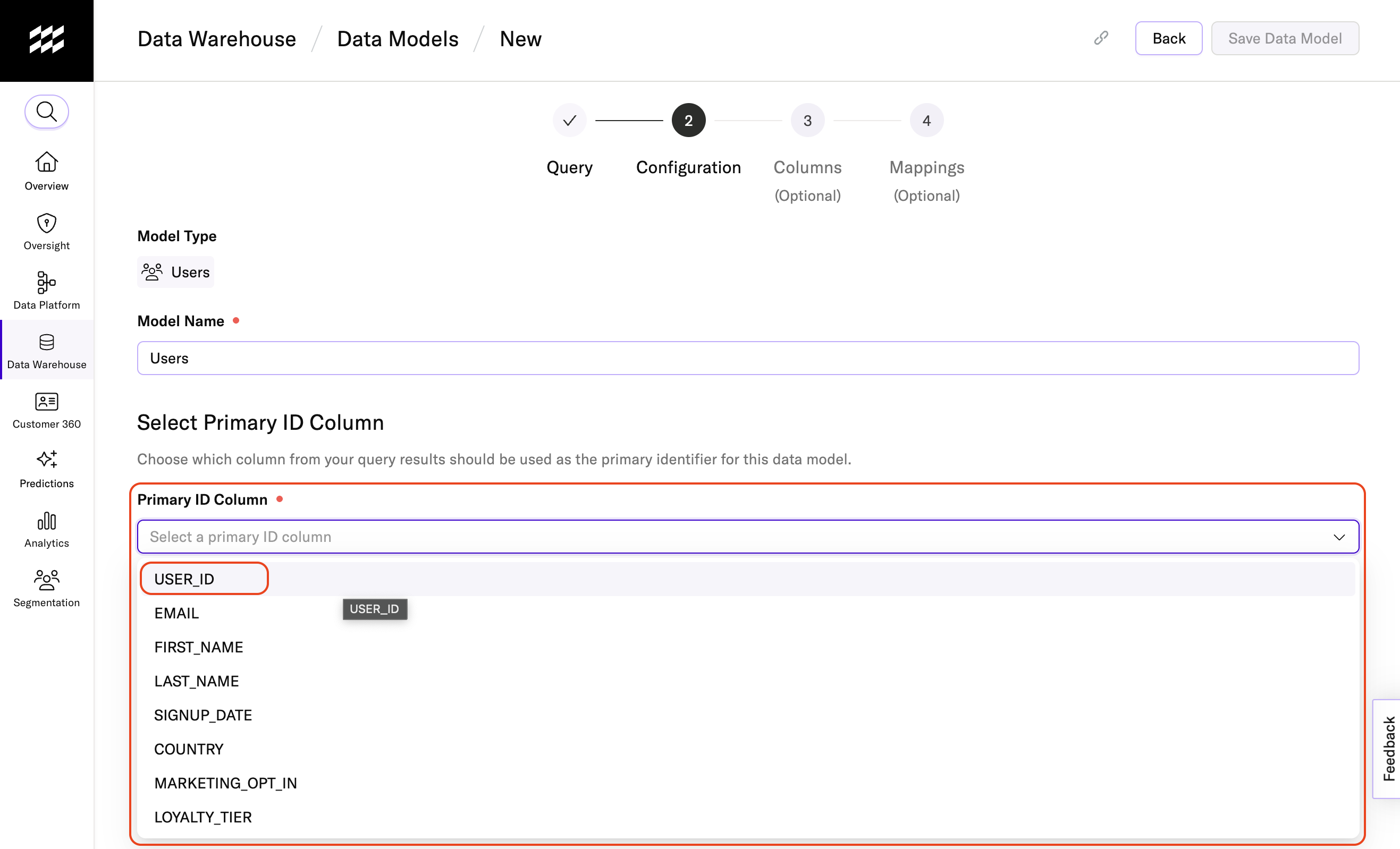
- Click Save Data Model to continue.
3. Enter your column settings (optional)
- Use the Enabled toggle to disable or re-enable a column.
- Review the data type mParticle detects for each column. Update if needed.
- Enable Autocomplete if you want values from this column to appear as suggestions when entering criteria in the Audience Builder. Values are cached for up to 7 days and then purged.
- Use the Is Case Sensitive (Yes/No) setting to control casing for autocomplete matches.
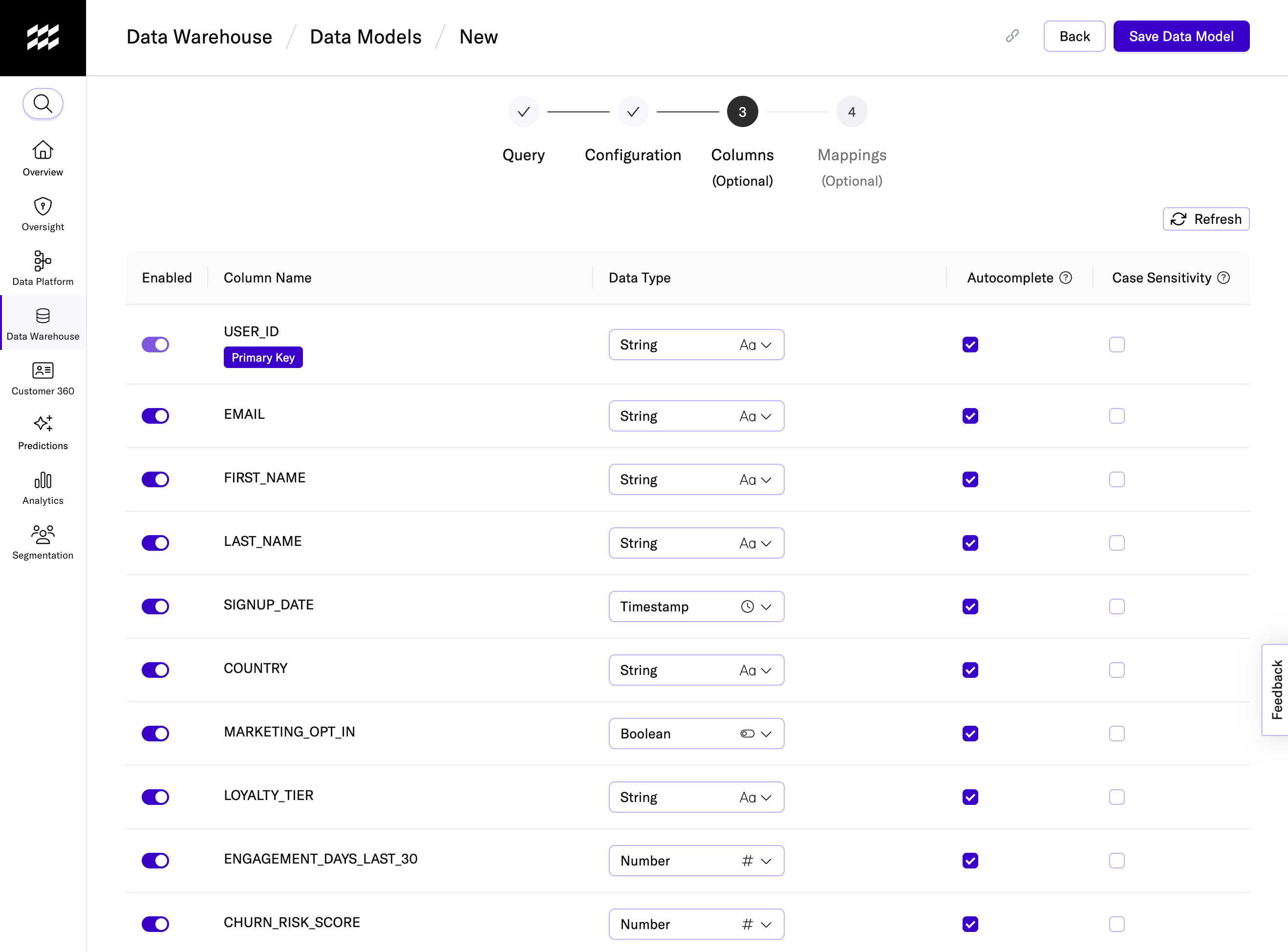
Click Save Data Model to continue.
4. Create column mappings
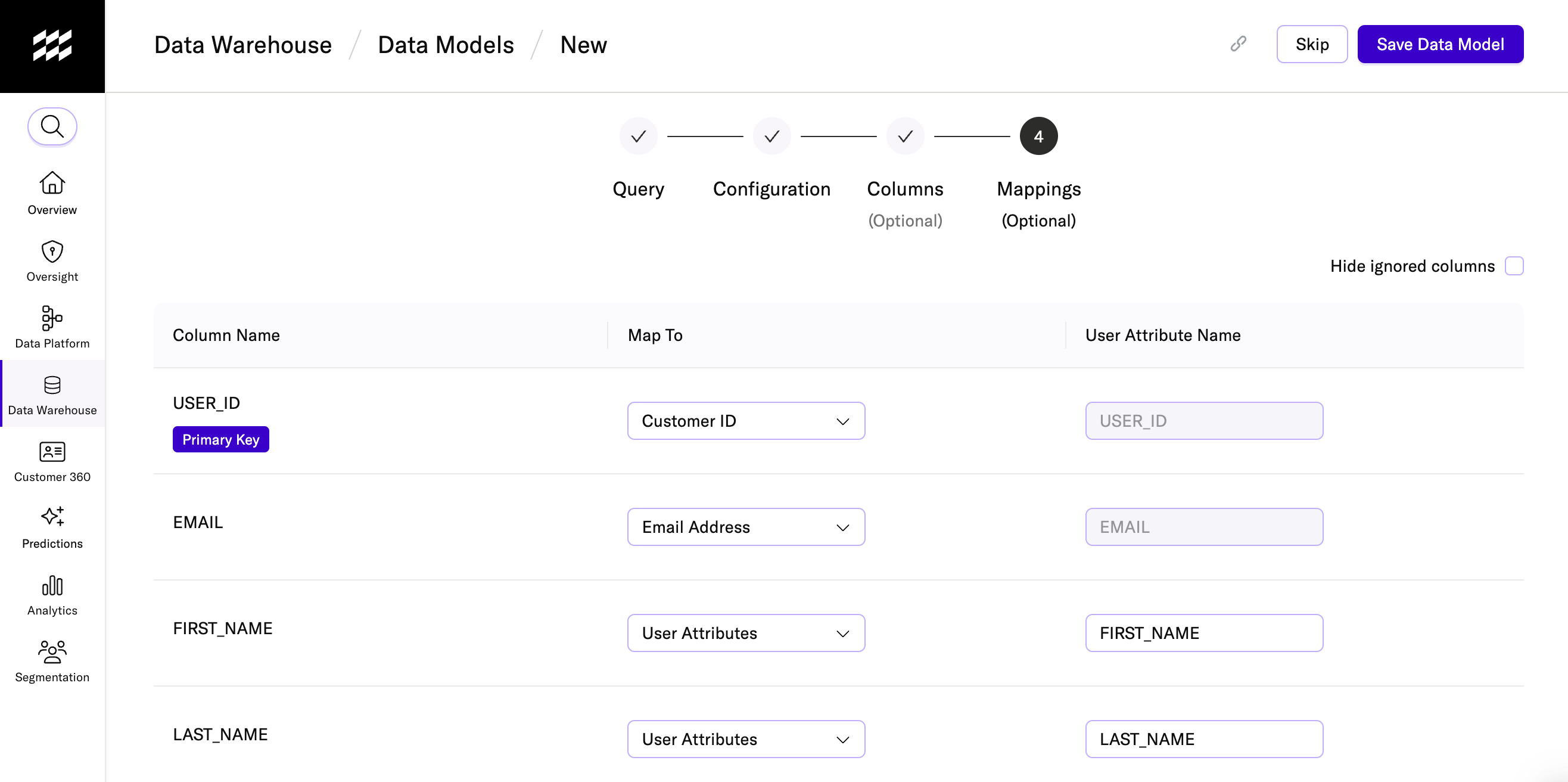
Mappings control how your warehouse data is interpreted in mParticle and by downstream partners.
User identifiers should be mapped to the correct user identifier type (like Email Address or Customer ID) so audiences can be matched and activated within downstream destinations. Descriptive fields, like a loyalty status or signup date, should be mapped to “User Attributes” to make them easier to find and use in the Audience Builder.
Although mappings are optional, you will likely need them to make sure your downstream integrations can effectively use your audience data. Downstream partners usually require identifiers for accurate matching, and mapped attributes make important fields easier for marketers to discover when building marketing campaigns.
- Choose the corresponding field name (user attribute or user identifier).
- Assign a display name for a more marketer-friendly label in the Audience Builder.
5. Confirm your identity settings
After completing your column mapping settings, confirm the identity settings for your user data model.
First, if you want to use this data model for a hybrid audience, you must turn on Enable this Data Model for Hybrid Audiences.
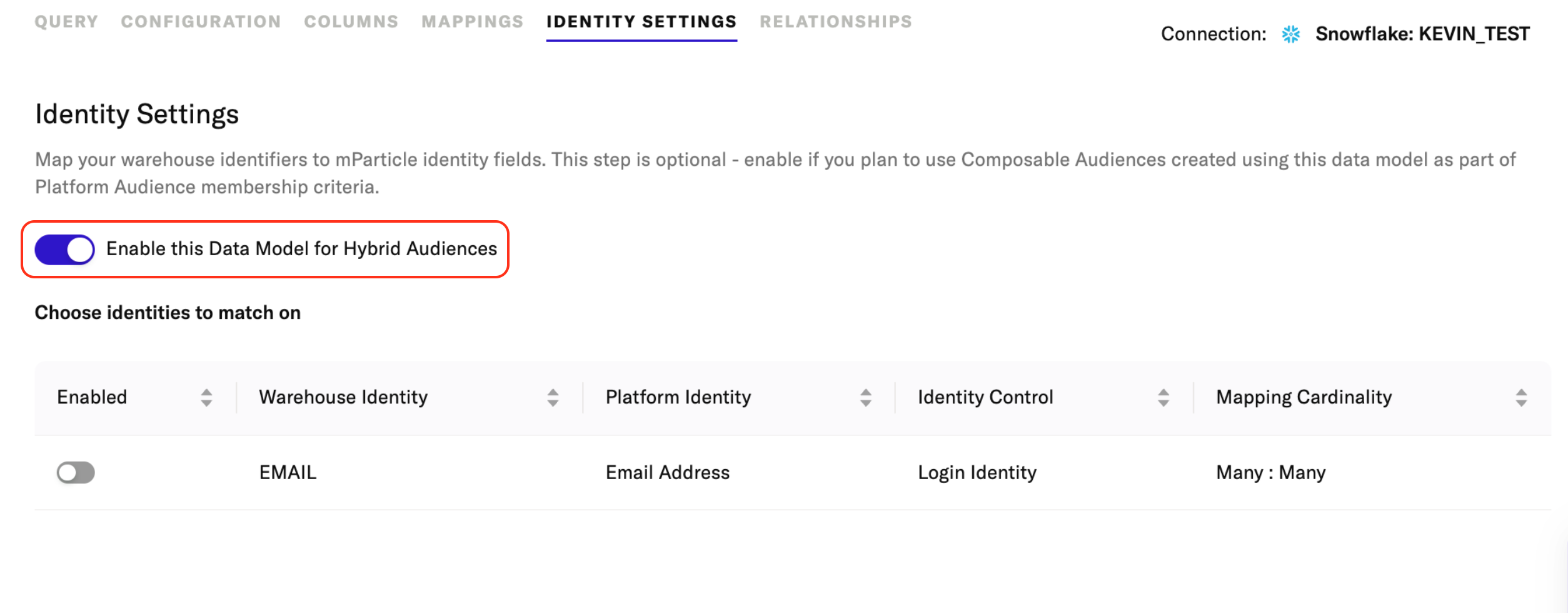
Under Choose identities to match on, review and enable the user identifiers that mParticle should use to match user records from your warehouse with user profiles in mParticle.
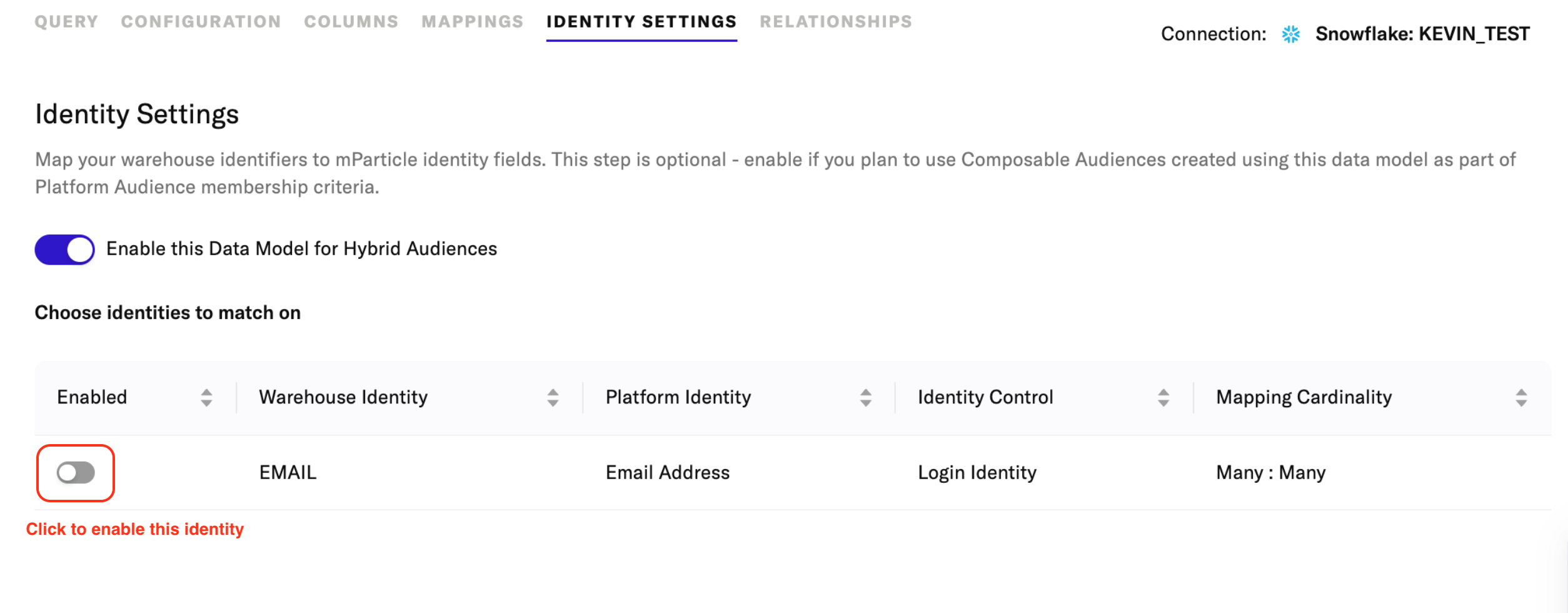
The table lists each identifier retrieved from your warehouse and shows:
- The identifier name in your warehouse.
- The corresponding identifier it is mapped to in mParticle.
- The mParticle identifier’s Identity Control configuration.
- The mapping cardinality between your warehouse identifier and your mParticle identifier
In order for the identifiers in your warehouse to appear in this list, they must be correctly mapped to their corresponding mParticle identifiers in the mapping settings.
Identity Control
The Identity Control column shows how the mParticle identifiers that your warehouse identifiers are mapped to are configured for identity resolution.
- Login identity: A login identity can be used to identify one, and only one, MPID for a known user.
- Unique identity: A unique identity value cannot be shared between profiles. For example, if customer_id is a unique identity, two profiles cannot share the same customer ID.
- Immutable identity: An immutable identity cannot be changed once it is set. Immutable identifiers must also be configured as both unique and login identities.
While these are referred to as “Identity Controls,” they are not modifiable here. These are read-only values that reflect how these identifiers are configured in mParticle. You should use this column to help verify that you are mapping your warehouse identifiers to the correct mParticle identifiers
Mapping Cardinality
The Mapping Cardinality column describes how identifiers in your warehouse relate to their corresponding identifiers in mParticle. You may see the following patterns:
-
One-to-One: Each warehouse identifier value maps to exactly one mParticle identifier value, and each mParticle identifier value maps to exactly one record in your warehouse. This occurs when:
- The warehouse identifier is the primary key.
- The mParticle identifier is configured as unique.
-
One-to-Many: Each warehouse identifier value maps to one mParticle identifier value, but the same mParticle identifier value may map to multiple records in your warehouse. This occurs when:
- The warehouse identifier is the primary key.
- The mParticle identifier is not unique.
-
Many-to-One: Multiple warehouse identifier values can map to the same mParticle identifier value. Each warehouse identifier value still maps to a single mParticle identifier value. This occurs when:
- The warehouse identifier is not the primary key.
- The mParticle identifier is unique.
-
Many-to-Many: Multiple warehouse identifier values can be mapped between multiple mParticle identifier values. This occurs when:
- The warehouse identifier is not the primary key.
- The mParticle identifier is not unique.
Was this page helpful?
- Last Updated: April 10, 2026